

Triangle Calculator
Solve Any Triangle No Guesswork

Adaptive to any given values
Know two sides, one angle, and one side; or one angle and a side: the calculator easily reconfigures itself and identifies the missing elements without misunderstanding.
Supports all triangle types
Functions with scalene, isosceles and right triangles, providing you with options of solving various geometry problems.
Instant calculation of unknown values
Quickly determines missing sides, internal angles, area, and perimeter in just seconds.
Built on proven mathematical formulas
Uses reliable methods like the law of sines and the Pythagorean theorem to ensure accurate and consistent results.
More right triangle support
For right-angled cases, you can easily verify results using a dedicated Pythagorean theorem calculator for added confidence.
How To Use The Triangle Calculator




Featured in




What Does A Triangle Calculator Do?
The tool is at its essence a solution of a triangle, utilizing familiar rules of connection between sides and angles. Once you have entered enough known values, the rest all follow a definite fixed pattern.
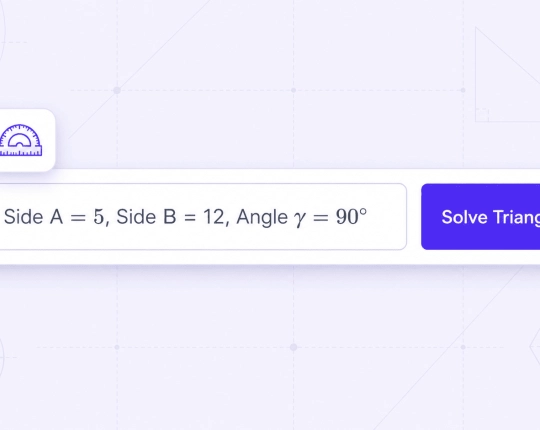
When you put in 3 sides, it will apply the cosine rule to compute the angles. Once you have entered two angles, it will find the third one very fast as all angles will make 180 degrees. It can also play with a combination of sides and angles and select the appropriate approach itself.
There is no need to move between formulas or check each step by hand. The calculator does the whole process simultaneously and maintains the results. You can also use a trigonometry solver to check the same values, should you want to check the steps or the results.
Types of Triangles and Triangle Properties
Triangles fall into different types based on their sides or angles:
- Right triangle: has one 90° angle and is often solved using the hypotenuse and the two legs
- Right-angled triangle: just another name for the same type
- Isosceles triangle: two sides are equal
- Scalene triangle: all sides have different lengths
If you want to understand the logic behind each step, a geometry AI tool can help explain how these triangle properties work in practice.
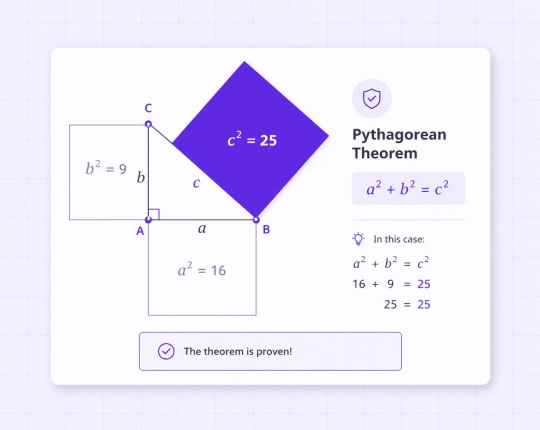
Important Formulas Used Behind the Scenes
The calculator uses basic rules from geometry and trigonometry to find missing values.
Pythagorean Theorem (Right Triangles)
Applied when you have two sides, and must have the third: \( a^2 + b^2 = c^2 \)
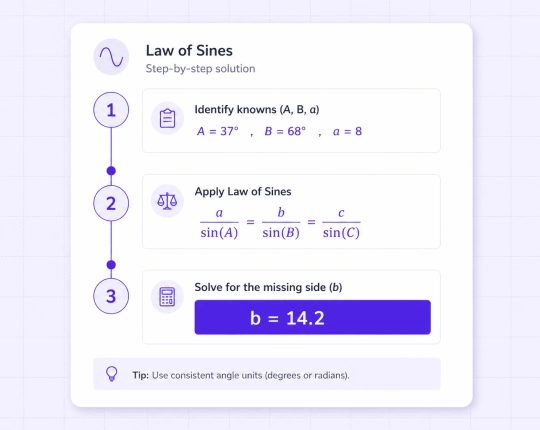
Law of Sines
When there are angles between you, and the opposite sides: \( \frac{a}{\sin(A)} = \frac{b}{\sin(B)} = \frac{c}{\sin(C)} \)
Law of Cosines
Applied when all sides are known or when you need an angle: \( c^2 = a^2 + b^2 – 2ab \cos(C) \)
The tool selects the right method based on the values you enter. If all three sides are known, it can also use Heron’s formula to calculate the triangle’s area.
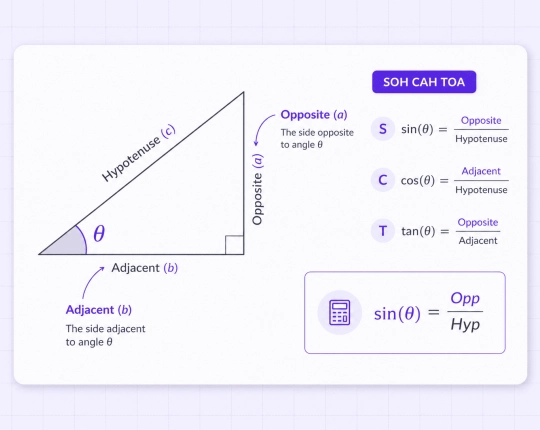
Triangle Calculator Step-by-Step Example
This is a simple example to demonstrate how it works. You have:
- side \( b = 3 \)
- side \( c = 4 \)
- one angle = \( 90^\circ \)
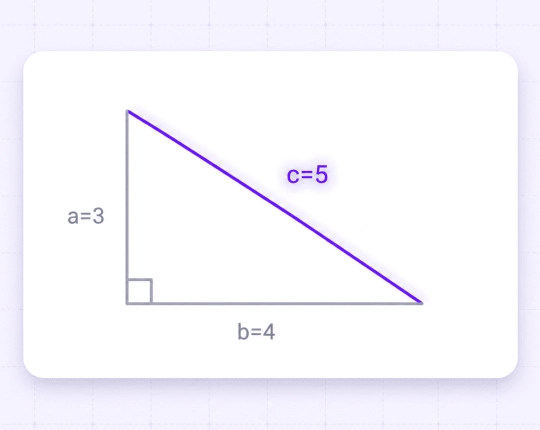
You get the missing side on the basis of the Pythagorean theorem, which is 5. You may verify this by a square root calculator on need. Then proceed to determine the other angles by sine and cosine. Then you add them all on for the perimeter which is 12.
Mistakes While Solving a Triangle
Even if you are careful about the steps, even the simplest problems can be confused.
- Mixing degrees and radians
- Using an incorrect formula on the values
- Confusion of the opposite angle/side
- Premature rounding of calculations
Other Calculations You Can Do
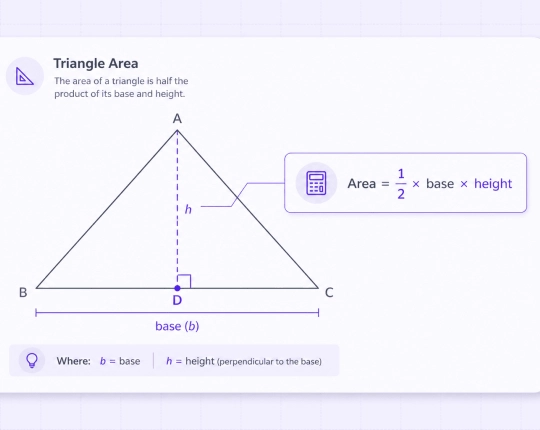
Besides basic values, the tool can help with more calculations. It can calculate that area through various equations and in case you need more specifics, a math solver AI can describe the functioning of each element. It is also able to verify which lines are related, compare ratios of sides and solve unknown sides or angles to produce the correct answer.
Free Online Math Calculators with Step-by-Step Solutions


Choose your plan
Free plan
- Unlimited use with ads included
- Free access to all AI tools
- Download all responses (answers, presentations, flashcards, etc.)
- Share responses with others
AI-Plus
- Expert reviews on discounted prices
- Ad-free experience to:
- AI detector
- Diagram generator
- PowerPoint generator
- Answer generator
- Flashcard maker
- Notes generator
- Research assistant
- Download all responses (answers, presentations, flashcards, etc.)
- Share responses with others
- Advanced reasoning
Expert help
- Presentations (human-made)
- Homework help
- STEM support
- Writing assistance
- Editing & proofreading

 Unlimited AI homework help

 Diagram Generator, Flashcard Maker, Notes Generator, Research Assistant, Answer Generator, AI Homework Helper & AI Detector